
We have effectively reduced our support cases (roughly by 30% in our first year).
For support, ops, and founder-led teams
Stop answering the same questions twice.
HelpSite builds a help center from your website and docs, and you approve every article. Customers find their own answers, and you see what they searched for but couldn't find.
Create your account, then add your website. No credit card to start.


- “It directs my clients to FAQs instead of just filling out the contact form — I stop answering the same questions repeatedly.” — Arthur D., Owner, IT and Services
- “We don't need an IT guy to do the coding for us. It made our work easier.” — Aimee N., Owner/Managing Director, Outsourcing
- “So simple to write an article and get it published on the site immediately. Such a great timesaver.” — Melissa C., Head of Product, Events Services
- “The self-service knowledge base has reduced ticket volume.” — Armando M., Design Engineer, Civil Engineering
- “Client users find it easy to access information and we find it easy to update and add new information.” — Chris D., Co-founder, Information Services
- “The sales department made it part of their presentations as a key selling point.” — Bradley U., Chief Content Creator, Marketing & Advertising
- “I like how it makes it super easy and friendly, so different users in the company can collaborate without having to know website publishing.” — Daniel H., Chief Executive Officer
How it works
From your website to a live help center in four steps.
1
Point it at what you have
Your website, PDFs, Google Drive, or pasted notes. No docs yet? A 30-second brief is enough.
2
Review the plan
Edit the proposed categories and article titles before a word is written.
3
Read sample drafts
Judge the writing on real articles before you generate the rest.
4
Approve and publish
Every article lands as a draft. Nothing goes live until you say so.
The maintenance paradox
Building it is the easy part now. Keeping it current is where most teams fail.
Most teams do not have a documentation problem. The docs exist — but they are scattered, hard to search, and nobody has time to keep them current. HelpSite is built for the part after launch, too.
Which one stings the most? Pick it →
HelpSite gives you one home for everything — public articles, private SOPs, and team playbooks — so there's a single place to look and a single place to update.
Fix this with HelpSite — start freeWhat makes HelpSite different
Build it. Let it answer. Keep it alive.
Build
AI KB Generator
Turn your website, PDFs, and Drive files into an organized knowledge base, reviewed by you before anything is created.
Learn about AI KB Generator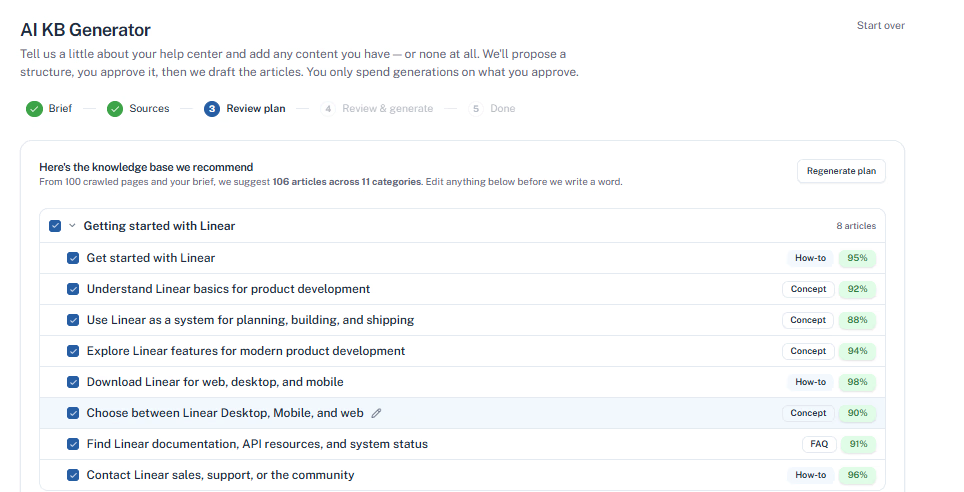
Answer
AI chatbot
Answer customer questions with AI grounded in your HelpSite articles, source links, and reviewable chat history.
Learn about AI chatbotPublic help centergrounded answer
How do I change my help center subdomain?
Open Settings, then General, and edit the subdomain field. Changes go live as soon as you save.
Custom domain or subdomain for your knowledge base · cited source
Not fully sure? Hand off to a human ->
Maintain
Analytics
See which articles work, what visitors search for, and which searches end without a click on any article.
Learn about Analytics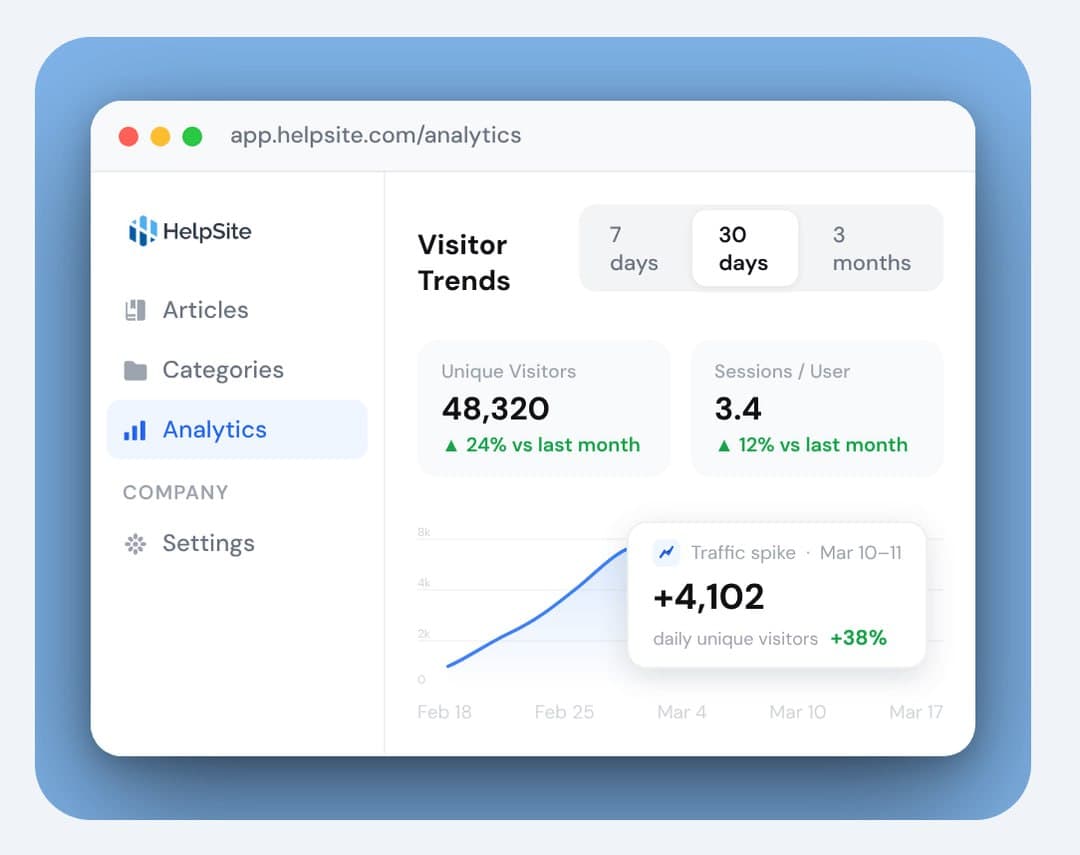
Start your 14-day free trial
No credit card to start · No per-seat pricing
Switching
Already have a help center? Bring it with you.
Coming from Zendesk, Intercom, Help Scout, Freshdesk, Helpjuice, Document360, Notion, or another tool? Paste your public help-center URL or upload a CSV, and HelpSite imports your articles as they are.
Short on time? Have us build it for you.
30-60%fewer repeat tickets when teams invest in self-service
1 placefor public help, private SOPs, and AI-grounded answers
2016helping teams answer recurring questions for over a decade
Free to start. No per-seat pricing.
Reviews
What teams are actually saying.
It directs my clients to FAQs in the KB instead of just filling out the contact form, which spares me from having to answer the same questions repeatedly.
So simple to write an article and get it published on the site immediately. Such a great timesaver.
Start your 14-day free trial
No credit card to start · No per-seat pricing
Questions
Everything you need to decide.
What is HelpSite?
HelpSite is a simple, AI-searchable knowledge base. Generate a help center from your website or docs, publish public articles, keep private internal SOPs, and let sourced AI answer repeat questions — all from one account.
Do I need existing docs to use the AI KB Generator?
No. Point it at your website, upload PDFs and docs, connect Google Drive, or paste text. If you have nothing yet, a 30-second brief about your audience and product is enough for it to propose a starter structure you can shape from there.
Will the AI publish articles without me?
No. You edit the proposed plan before anything is written, read sample drafts before generating the rest, and every article lands as a draft. Nothing goes live until you approve it.
How is it different from Notion or a wiki?
Each was built for a different job. Notion, Google Docs, and wikis are great for writing things down, but not for finding them — and they sit behind a login, so customers never see them. HelpSite is built to answer repeat questions: a searchable help center you can make public or keep private, with AI answers grounded in your own articles.
Do I still need a separate help desk?
Maybe not. HelpSite isn't a ticketing system — it's the self-service layer that answers repeat questions before they become tickets. If most of your support is the same questions over and over, a good help center can mean you need a help desk far less, or not yet at all.
Can I run a public help center and a private internal knowledge base together?
Yes. Run public articles for customers and private SOPs for your team in the same workspace, and control who can see each one.
Is the AI accurate, or will it make things up?
AI answers are grounded in your own articles, not the open web, and each one links to its source so readers can check it. When your articles don't cover a question, it says so instead of guessing. It's only as good as the articles behind it — which also means you control what it can say.
How hard is it to move our existing docs over?
If you already have a help center, you can import your existing articles using a public URL or CSV file. HelpSite brings your content over without AI rewriting, and you can review everything before publishing. If you're starting with source materials instead, the AI KB Generator can create new article drafts for you.
Stop being the answer person.
Build it from what you already have, then let it answer the same questions so you don't have to.
Start your 14-day free trialNo credit card to start · No per-seat pricing